
Guide
Daily Free Coins: Where to Find Them and How to Claim
Build a 10–15 minute daily routine to claim free Gold Coins and occasional Sweeps Coins via app, email, and social—plus streak, reset, and timing tips.
Filed
Key facts
- Filed
- Author
- Casey Leder
- Read time
- 12 min read
Daily Free Coins: Where to Find Them and How to Claim
SC/GC in one line: SC = Sweeps Coins (promotional entries you can redeem for cash/prizes where allowed); GC = Gold Coins (play‑for‑fun coins with no redemption value).
Disclosure: We may earn a commission when you use our links. No purchase necessary. Sweepstakes subject to eligibility. 18+ / 21+ where required. Void where prohibited. Play responsibly.
Quick answer: Your repeatable daily routine (10–15 minutes, 3 touchpoints)
If you only read one section, make it this. Here is a simple, repeatable daily routine that gathers most free GC and occasional SC from sweepstakes-style sites in eligible states:
- Morning (5 minutes)
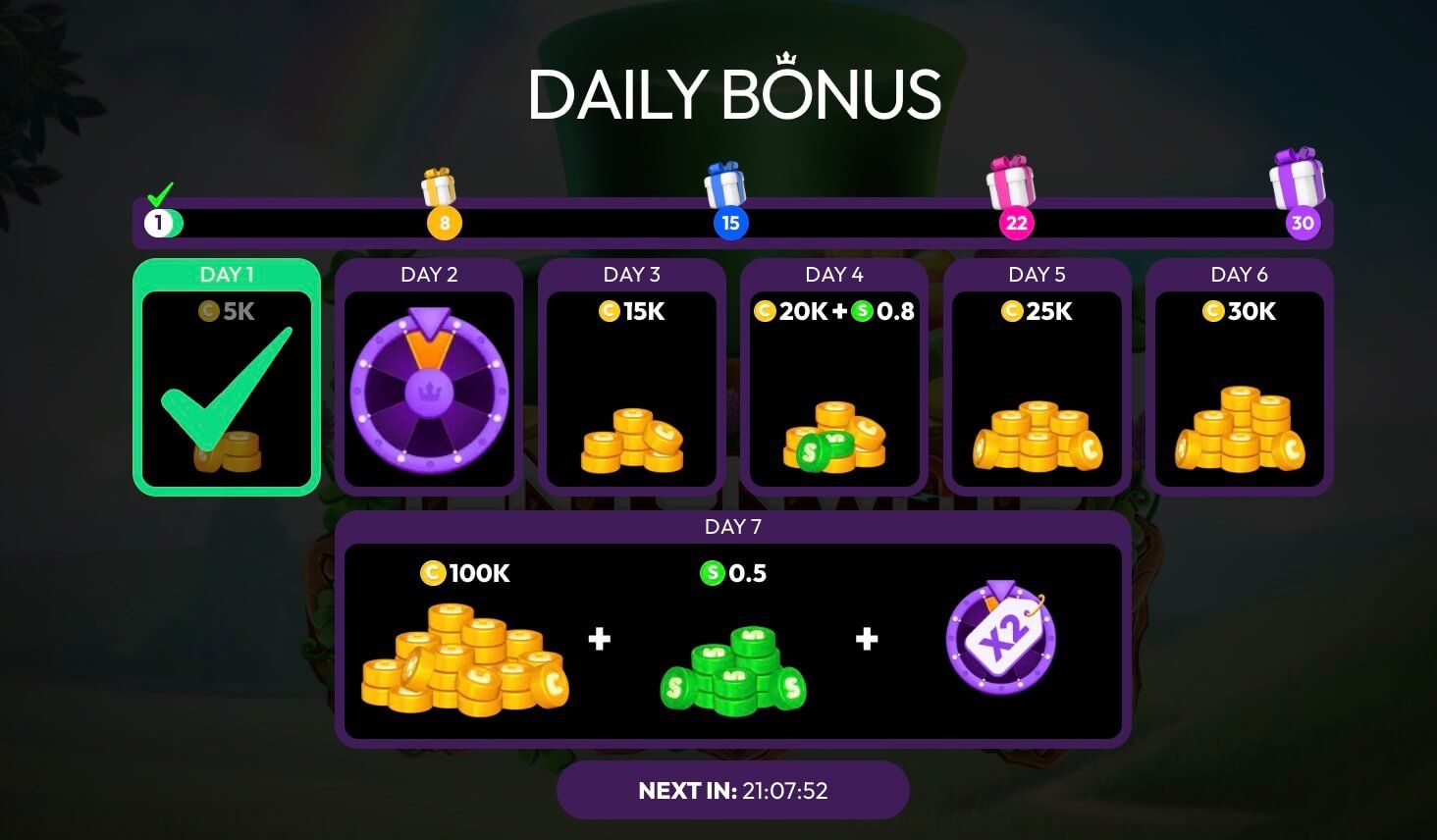
- Open the app/site and claim the Daily Bonus modal. Time to claim: 10–30 seconds. Outcome: instant GC credit; some sites add a small SC drip or streak multiplier.
- Tap the daily wheel/check-in calendar if shown. Time: 10–30 seconds. Outcome: GC credit; streaks may increase rewards after 3–7 consecutive days.
- Check your in-app inbox or notifications. Time: 30–60 seconds. Outcome: promo drops, calendar reminders, and occasional SC giveaways.
- Midday (3–5 minutes)
- Scan official social channels (X/Twitter, Facebook, Instagram, Discord) for claim links or time-window drops. Time per claim: 15–60 seconds. Outcome: GC bundles; some events include SC in small amounts. Many posts expire within hours.
- Evening (3–5 minutes)
- Open your email and search for brand name + words like bonus, claim, free. Time: 2–3 minutes. Outcome: 1–3 claim links per week from most operators; click-to-claim credits instantly or within 1–2 minutes. Some links expire in 24 hours.
Optional hourly: If your site offers hourly freebies, set 1–2 reminders during the day. Time per claim: 10–20 seconds. Outcome: small GC top-ups; contributes to longer play sessions.
Save streaks: Try not to miss the daily claim. Streak resets typically occur after 24 hours; some allow a 1–4 hour grace window. Check your bonus modal for the exact reset time.
Tip: Put a 2-minute alarm near your usual coffee break. One alarm = daily bonus, inbox, social scan. This single habit captures most value with minimal effort.

What counts as daily free coins (and what doesn’t)
Daily free coins typically include:
- Daily bonus modal: A button or spinner that awards GC instantly; sometimes includes a small SC amount or streak multiplier.
- Check-in calendar or wheel: A day-by-day panel that increases GC after consecutive days. Often resets if you miss a day.
- Hourly/periodic freebies: Claimable every 60 minutes or a fixed number of times per day.
- Inbox messages: In-app gifts, make-up bonuses, and event reminders.
- Email and SMS claim links: Click-to-claim pages that auto-credit GC and occasionally SC.
- Social claims: Links or codes posted on official channels (X, Facebook, Instagram, Discord). Often time-limited.
What usually doesn’t count as daily free coins:
- Purchases. Buying GC bundles is optional and separate from freebies.
- Tournaments that require entry fees. Free-entry promos may exist but are usually time-bound or event-based.
Warning: Each operator has its own rules. Amounts, reset times, and availability vary. Always review the site’s Terms and Promotions pages.
Where to find daily claims inside the app/site
Operators label things differently, but the free claim areas are generally in these places:
- Home screen: Look for a Daily Bonus banner or a floating button. Typical labels: Daily Bonus, Claim, Free, Rewards.
- Navigation bar: A gift icon, calendar icon, or Rewards tab often contains daily and periodic freebies.
- Store: A Free section at the top of the store can include GC claim buttons; some sites place free claims near the smallest bundle.
- Inbox/Notifications: Tap the bell/mail icon for credit confirmations, make-up bonuses, and event drops.
- Profile or Wallet: Streak trackers and claim histories may live here.
- Help/Promotions page: Details on reset times, streak rules, and eligible claim windows.
Tip: If you can’t find the daily bonus, use the site’s search/help field and type ‘daily bonus’, ‘free’, or ‘streak’. Bookmark the direct claim URL if the operator uses a consistent link.

Social media claims: how and where to look (2–4 minutes/day)
Most operators post 3–7 social freebies per week. Here’s how to cover them efficiently:
- X/Twitter: Check the profile’s pinned post and latest tweets. Look for ‘Claim’, ‘Drop’, ‘Free’, or a short link. Many links expire same-day.
- Facebook: Check the latest post and any Stories. Some operators host claim links in comments during live events.
- Instagram: Claims appear in Stories (swipe-up or link sticker) and occasionally in the bio link.
- Discord: Join the official server and watch channels named announcements, giveaways, or codes. Some require quick reactions within minutes.
- YouTube/TikTok: Link-in-bio or description claims appear during live streams or new video drops.
Time expectation: 15–60 seconds per claim. You can check all active channels in under 3 minutes if you go straight to pinned posts and announcement channels.
Outcome: GC most of the time; occasional SC drops during special events. Crediting is typically instant.
Pro tip: Turn on notifications for posts from the official account only. This reduces noise and catches short-window drops. Revisit privacy settings monthly to keep alerts relevant.
Email opt-in and inbox filtering for reliable claims (3 minutes setup, 30 seconds/day)
To consistently capture email claims:
- Opt in to marketing emails: Go to Profile/Settings > Communications. Check the marketing/email box and save. Some brands send a confirmation message—click confirm.
- Whitelist the sender: Add the brand’s address to your contacts or Safe Senders list so claim emails don’t land in spam.
- Create a folder and filter: Use keywords like ‘claim’, ‘bonus’, ‘free’, and the brand name to auto-route promo emails to a dedicated folder.
- Daily scan: Open the folder once a day, click claim links, and close it. Most credits apply instantly.
Time expectation: 3–5 minutes to set up; 30–60 seconds per day to review.
Outcome: Consistent GC claims, with occasional SC. Links may expire in 12–48 hours; act the same day to avoid missing out.
Tip: If emails stop arriving, re-confirm your email, check the spam folder weekly, and verify that you didn’t opt out during a prior unsubscribe.

Step-by-step: Claim your daily freebies
-
Open the app/site and locate the Daily Bonus modal
- Where: Home screen or Rewards tab
- Time: 10–30 seconds
- Outcome: GC credit; possible streak multiplier information
- Reset: Typically every 24 hours (check the modal for the exact reset time)
-
Tap the daily calendar or wheel
- Where: Rewards, Calendar, or Home
- Time: 10–30 seconds
- Outcome: GC credit; streak bonuses after consecutive days
- Reset: Daily; missing a day usually resets streak
-
Check the inbox/notifications
- Where: Bell/mail icon
- Time: 30–60 seconds
- Outcome: Extra GC from event reminders or make-up gifts
- Reset: Messages vary; claim as soon as you see them
-
Scan social channels for claim links
- Where: X/Twitter pinned post, Facebook latest post/Stories, Instagram Stories/bio, Discord announcements
- Time: 15–60 seconds per claim
- Outcome: GC credit; occasional SC during special posts
- Reset: Often same-day expiration; many drops are first-come or time-limited
-
Check email for claim links
- Where: Your filtered promo folder
- Time: 30–90 seconds
- Outcome: Instant GC credit; some SC credits possible
- Reset: Links often expire in 24 hours; click the same day
-
Claim any hourly or periodic freebies
- Where: Rewards/Store > Free, or a countdown timer on Home
- Time: 10–20 seconds
- Outcome: Small GC top-ups; supports longer play sessions
- Reset: Typically every 60 minutes; some sites limit to a fixed number per day
-
Optional—Complete easy daily tasks
- Where: Missions/Challenges tab
- Time: 2–5 minutes
- Outcome: GC; occasional SC during events
- Reset: Daily or weekly depending on the task
Pro tip: Batch your claims. Morning: Steps 1–3. Midday: Step 4. Evening: Step 5. Insert Step 6 whenever your hourly timer is up. Batching reduces time wasted switching contexts.
Understand reset times, streaks, and time zones
- Daily reset: Many operators reset at midnight based on server time. The bonus modal usually shows a countdown. If it doesn’t, note the time you claimed today and check when it next becomes available—this defines your 24-hour cycle.
- Streak rules: Streaks often award larger GC on days 3, 5, or 7. Missing one day typically resets you to day 1. Some operators offer a streak saver or grace window; look for a note in the calendar.
- Time zones: If you travel or use VPNs, your claim window may shift or be blocked. Claims should be made from eligible states without VPNs to avoid account issues.
Warning: Using a VPN or claiming from an ineligible location can void promotions or lock your account. Always claim from eligible states listed by the operator.
Track your value calmly and clearly (2-minute template)
A simple tracker helps you see the benefit without guesswork. Create a one-page sheet with these columns:
- Date
- Site/brand
- GC claimed (per day)
- SC claimed (per day)
- Minutes spent
- Notes (streak day, special social drop, missed claim)
After 2 weeks, you’ll know:
- Average daily GC and SC credits
- Real time cost (minutes/day)
- Which channels (app, social, email) yield the most value for you
Tip: If a channel nets zero claims over 14 days, turn off notifications and re-check monthly. Keep only what performs.
Troubleshooting common claim issues
- Claim button greyed out: You may be early. Wait for the countdown to reach 0:00. Refresh once and try again.
- Link expired: Most email/social links expire within 12–48 hours. Act the same day. If a link fails, check the brand’s most recent post for a replacement.
- Not in an eligible state: Claims generally require presence in eligible states. Check the site’s eligibility page; some states or countries are excluded.
- Identity or verification prompts: Some operators require email/phone verification before crediting. Complete verification once; future claims should be instant.
- Multiple accounts or shared devices: Most sites allow one account per person. Avoid claiming from multiple accounts on the same device.
- Ad blocker or private relay: Disable blockers for the claim domain if credits don’t show. Credits typically appear within 1–2 minutes after a successful claim page load.
Pro tip: If a claim doesn’t credit within 5 minutes, take a screenshot of the claim page and your wallet balance, then contact support with timestamps.
Make your daily routine stick (reminders and habits)
- Phone reminders: Set three alarms labeled ‘Claim: Morning’, ‘Claim: Social’, ‘Claim: Email’. Each is a 2–3 minute task.
- Homescreen folder: Group all brand apps into a single folder. Open the folder when your morning alarm rings and tap through each app in a row.
- Notification tuning: Keep notifications for official accounts and inbox messages only. Mute chatty channels that don’t include claims.
- Weekly review: Every Sunday, review your tracker for 2 minutes. Adjust which channels you check first.
Outcome: A predictable routine that takes 10–15 minutes total per day and captures the bulk of daily free play value.
Stretch value with predictable SC redemptions
- Separate goals: Use GC for longer play sessions. Use SC to play for prizes where allowed. Track your SC balance and note the site’s minimum redemption threshold.
- Consistency over chasing: A steady daily SC trickle from emails or events can add up. Note the average SC per week you receive, then estimate how many weeks to your next redemption opportunity.
- Clear records: Keep a simple log of SC redemptions (date, amount, method). This keeps you disciplined and reduces surprises.
Tip: When you’re within 10–20% of a site’s SC redemption minimum, reduce riskier play and focus on games you know well. The goal is predictable redemption opportunities, not fast swings.
Safety, eligibility, and responsible play
- Eligibility: Offers are for eligible states only. Check each operator’s Terms for regional restrictions.
- Age: 18+ or 21+ where required. Verify your age and identity promptly to prevent delays.
- One account per person: Don’t create duplicates. This can void promotions and balances.
- Geolocation: Claims must be made without VPNs/proxies to avoid compliance issues.
- Taxes and reporting: If you redeem SC for cash/prizes, keep records and consult the operator’s tax guidance.
- Time boundaries: Cap your daily claim routine at 15 minutes. Set a weekly play budget. Play responsibly.
Required screenshots to capture (for your own reference)
- Daily bonus modal: Show the button, countdown timer, and any streak indicator.
- Social media claims area: Example of a pinned post or announcement channel with a live claim link.
- Email opt-in example: Settings screen showing marketing email toggle, plus an inbox example with a claim email.
Tip: Screenshots help support resolve missing credits faster—include timestamps.
Frequently asked questions
How many times per day can I claim freebies?
Most sites offer one daily bonus, plus hourly or periodic freebies. Social/email claims vary by day (often 0–2). Check your Rewards tab for limits.
What happens if I miss a day?
You’ll usually lose your streak and return to day 1. Some sites offer a streak saver; look for it in the calendar.
Do email and social claims always include SC?
No. Most are GC. SC appears during special events or promotions. Read each post or email for details.
How long do claim credits take to appear?
In-app claims: instant. Social/email links: usually instant to 2 minutes. If not visible after 5 minutes, refresh and check your wallet.
Can I redeem SC right away?
You can redeem SC for cash/prizes once you meet the site’s minimums and eligibility requirements. Minimums and processing times vary by operator.
Next steps
- Set three reminders today: Morning (Daily Bonus + Inbox), Midday (Social check), Evening (Email claims).
- Create your simple tracker (Date, GC, SC, Minutes). Start with a 14-day trial.
- Tune notifications so you only see official claim alerts.
Related resources:
- Operator Terms and Promotions pages (for reset times and eligibility)
- Responsible play resources in your state
Disclosure: We may earn a commission when you use our links. No purchase necessary. Sweepstakes subject to eligibility. 18+ / 21+ where required. Void where prohibited. Play responsibly.